

BlinkWrite vs Perplexity for writing: inline speed or cited research?
Opening verdict
BlinkWrite is the faster choice for everyday Mac writing because it prepares replies and edits text inside the active field. Perplexity is better for current research, cited answers, files, and research-backed documents.
Overview
BlinkWrite vs Perplexity
| Area | BlinkWrite | Perplexity |
|---|---|---|
| Best for | Mac users who want faster everyday replies and edits inside the active text field | People who want current web research, source-backed answers, file analysis, and research-led documents |
| Writing flow | Suggestions appear automatically or inline; Tab accepts them without leaving the app | The user starts with a search or task, then checks sources and refines or exports the result |
| Replies | Prepares replies from the visible conversation before the user types | Drafts replies after the user supplies context and an instruction or starts a desktop task |
| Custom rephrasing | Type an open-ended instruction and review the result beside the active text field | Use a prompt and follow-up requests to rewrite or refine text in a thread or generated document |
| Context | Uses text around the cursor and the visible conversation in supported fields | Can use live web sources, files, Projects, connected tools, and approved desktop context |
| Privacy | Masks personal data on the Mac before self-hosted processing | Offers an AI Data Usage opt-out, Incognito searches, and controls for uploaded files |
| Platforms | Apple silicon Macs with macOS 26 or later | Web, macOS, Windows, iOS, and Android; desktop and creation features vary by plan and surface |
Perplexity features vary by plan and surface. This comparison focuses on everyday writing on a compatible Mac.
Why choose BlinkWrite over Perplexity
The reply is ready before typing
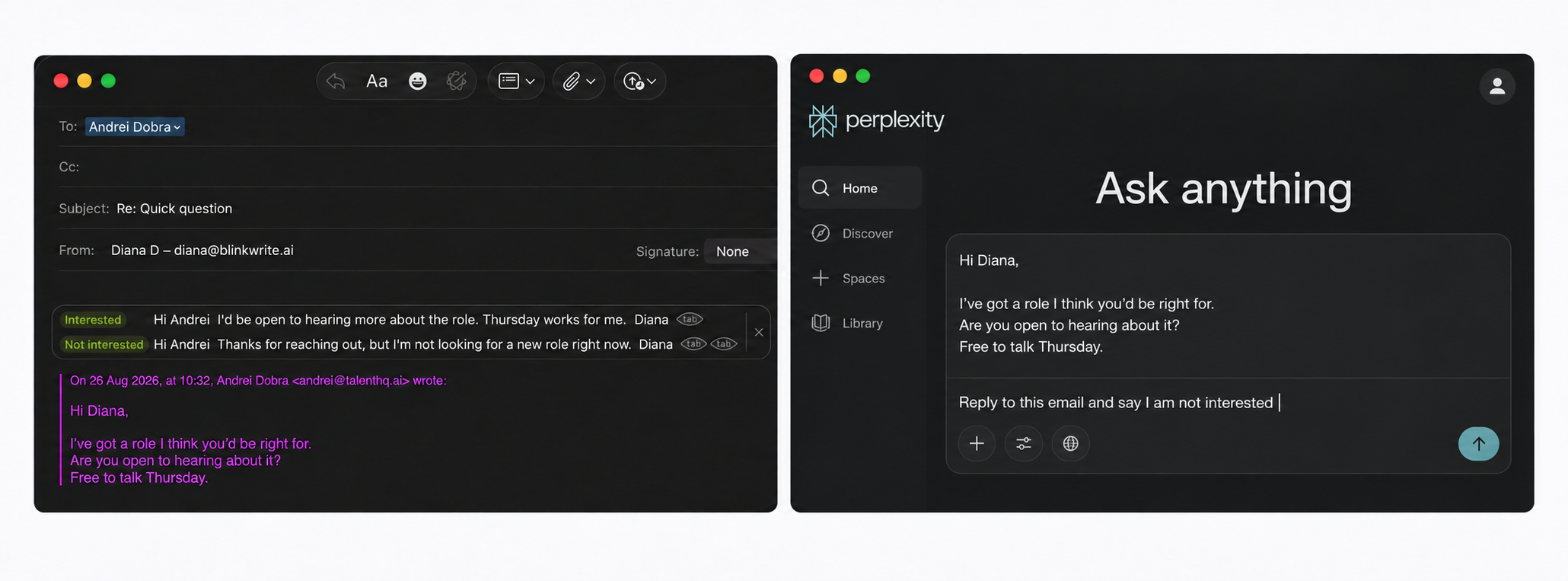
BlinkWrite: choose a reply and press Tab
BlinkWrite reads the email and offers two replies inside the compose field. Press Tab for the first or double-tap Tab for the second. There is no prompt and no text to move.
Perplexity: provide the email and explain the task
Open Perplexity, add the email, ask for the reply, review the result, then return it to the email. The user must start and direct the task.
BlinkWrite is easier for a quick reply: the context is already there, the options are already written, and the reply stays in the email field.
Custom rephrasing
Both products follow custom instructions. BlinkWrite opens the rewrite beside the active field and applies it with Tab. Perplexity is better when the revision also needs live research, sources, or a longer document workflow.
Where Perplexity is stronger
Choose Perplexity for current web research, source-backed answers, file analysis, or documents that need citations. Its help center describes the product as an AI-powered search engine with verifiable sources.
Which should you choose?
Choose BlinkWrite when you use a compatible Mac and want fast help in the text field where daily communication happens.
Choose BlinkWrite if
- You want a reply prepared before you start typing.
- You want completions, corrections, and rewrites in the active field.
- You want to accept suggestions with Tab instead of starting a research task.
Choose Perplexity if
- You need current web research with links to sources.
- You want to analyze files or create research-backed documents.
- You need web, Windows, or mobile access alongside Mac.
Frequently asked questions
Is BlinkWrite a good Perplexity alternative for writing on Mac?
Yes, when the main goal is faster email, chat, and everyday workplace writing. Perplexity remains stronger for current research, cited answers, file analysis, and research-backed documents.
What is the main difference between BlinkWrite and Perplexity?
BlinkWrite works automatically in the active Mac text field. Perplexity is a research-first assistant that normally starts with a search question or task.
Can Perplexity draft replies before I type?
Perplexity can draft a reply after it receives the message context and an instruction. BlinkWrite prepares likely replies automatically inside supported text fields before the user types.
Which product is better for research-backed writing?
Perplexity is stronger when the writing needs current web research and citations. BlinkWrite is faster when the source context is already visible in an everyday Mac app.
Published and reviewed by BlinkWrite
How this comparison was made
BlinkWrite descriptions come from the current product and its documentation. Perplexity claims were checked against the official sources linked on this page. The comparison covers documented features, workflows, availability, and policies; it does not claim measured speed or suggestion quality unless stated.
Published and last updated . Product features, prices, and policies can change.
Sources
Facts last checked . Product availability, prices, and policies can change.